Test the workflow
Free trial
$0 trial download
Use your own HTML, or start with an animation from HTMLHub.
- 10 trial renders
- Up to 1920 × 1080 resolution
- Up to 10 seconds per video
- Windows x64 desktop app
- Test your files and hardware before upgrading
HTML in. Video out. On your PC.
Turn HTML, CSS and JavaScript animations into videos for your posts, presentations and edits. Open a file, choose your settings, and render locally on Windows.
10 trial renders · Up to 1080p · 10 seconds per video
Start with a free HTMLHub animation →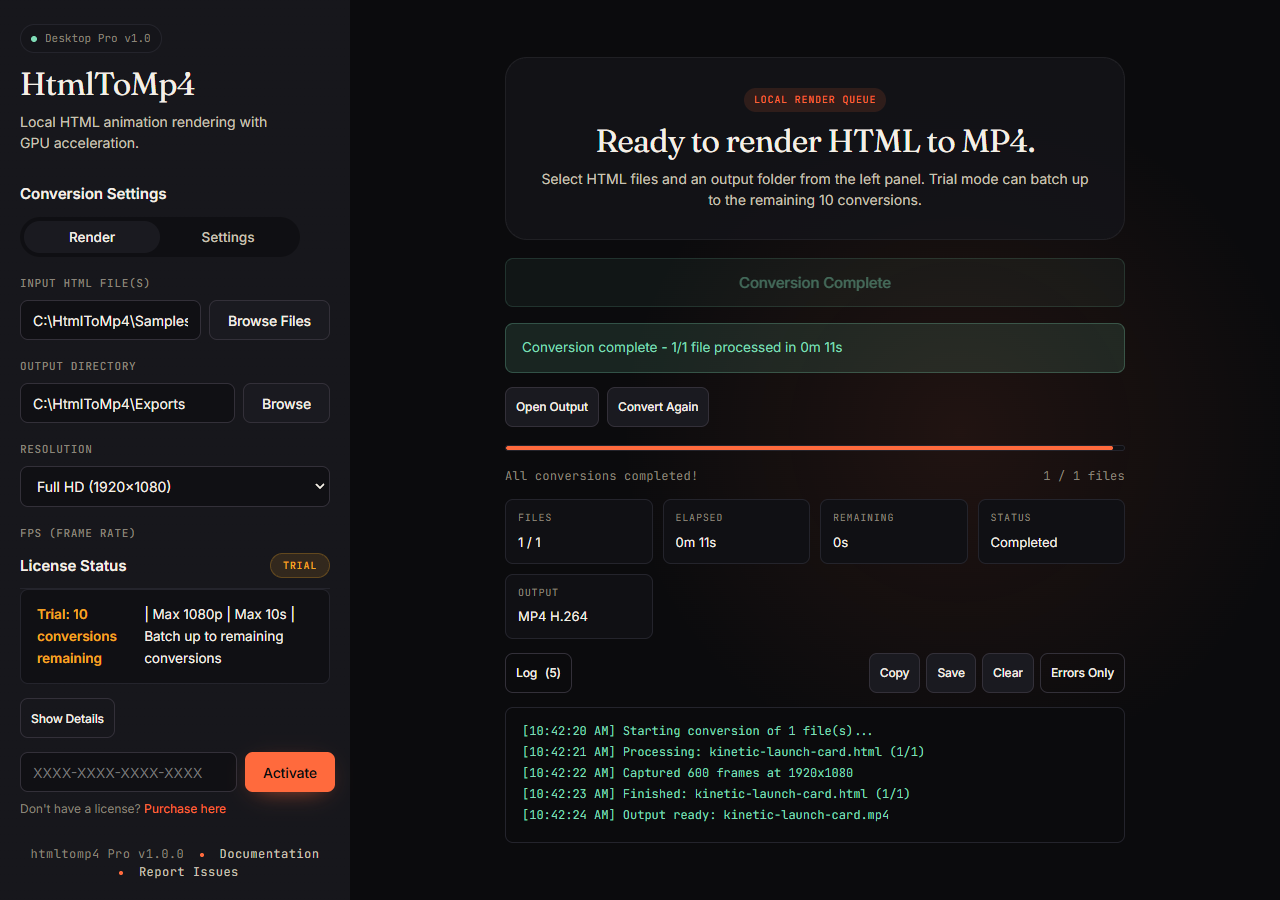
See it before you download
Watch the 15-second app walkthrough, then compare an HTMLHub animation with the video exported from it.
Technical HTML-to-MP4 proof
A live HTMLHub animation and the MP4 exported from the same source.
<!-- htmlhub.org / animations / vanta-clouds.html -->
<div id="vanta"></div>

<script>
  VANTA.CLOUDS({
    el: "#vanta",
    mouseControls: true,
    touchControls: true,
    skyColor: 0x78c6df,
    cloudColor: 0xc9d8f2,
    cloudShadowColor: 0x1b3354,
    sunColor: 0xffa24c,
    speed: 0.8,
    scale: 3
  });
</script>How it works
Download an HTMLHub effect or save your own HTML animation. Open it in Chrome first and keep any required scripts, fonts and images with it.
Open the file in the Windows app. Start with 1920 × 1080, 30 fps and 5 seconds. Choose an output folder and render.
Open the output, check the motion, and add it to your video editor, presentation or social post. Adjust and render again when you need a different look.
Simple pricing
Check that your animation works on your PC before buying. Pro is a one-time purchase, with no monthly subscription.
Test the workflow
$0 trial download
Use your own HTML, or start with an animation from HTMLHub.
Keep creating
CAD $79 one-time payment
The same app, with the trial limits unlocked.
Sold through Gumroad. Applicable taxes and your checkout currency are shown there.
Rendering runs on your computer. Pro activation requires internet, with up to 30 days of offline use between license checks. Check compatibility →
Product proof
These are real captures from the Windows x64 trial flow: file selection, encoder detection, render progress, completion, and the final MP4 output.
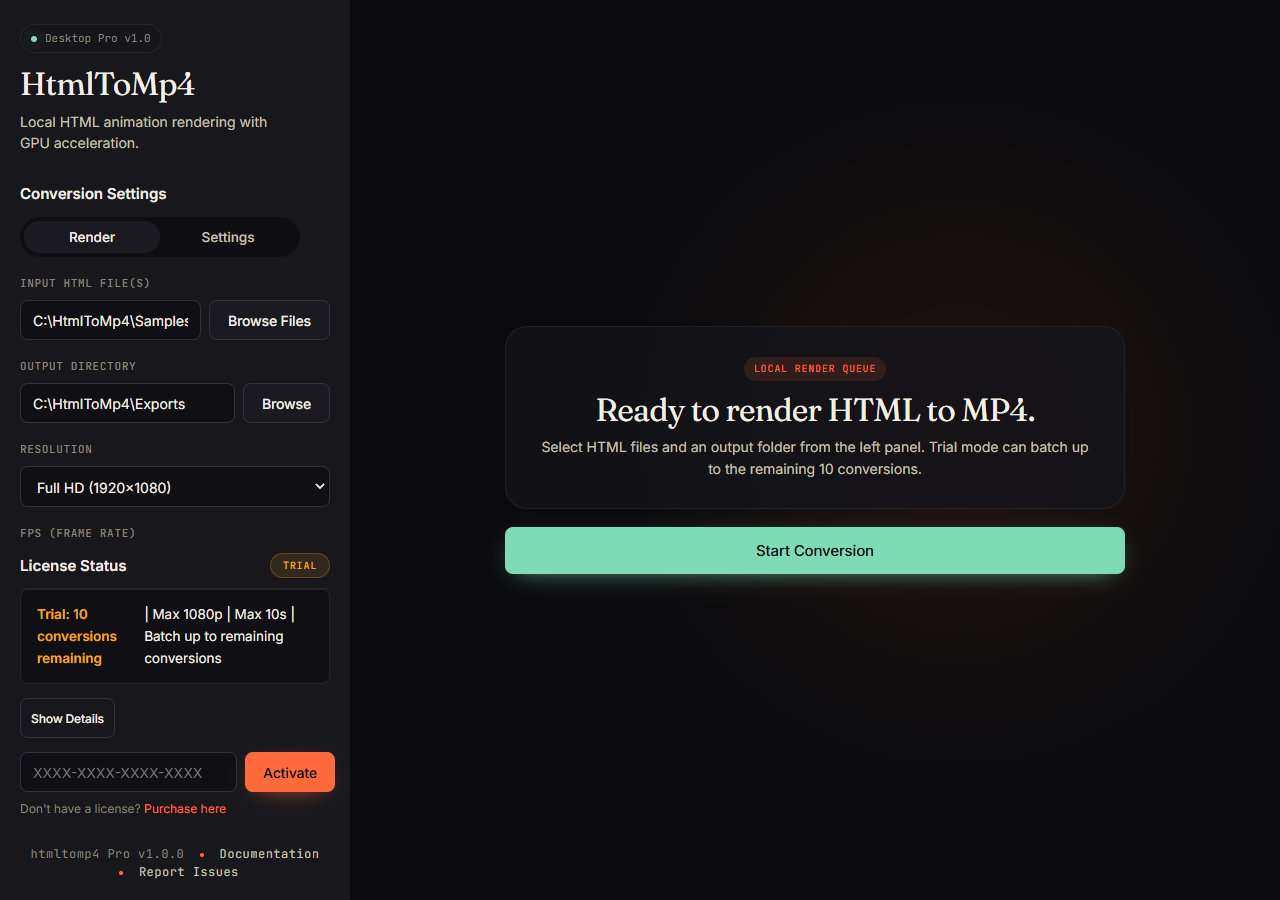
01
Select local HTML files, choose an output folder, and confirm trial limits before rendering.
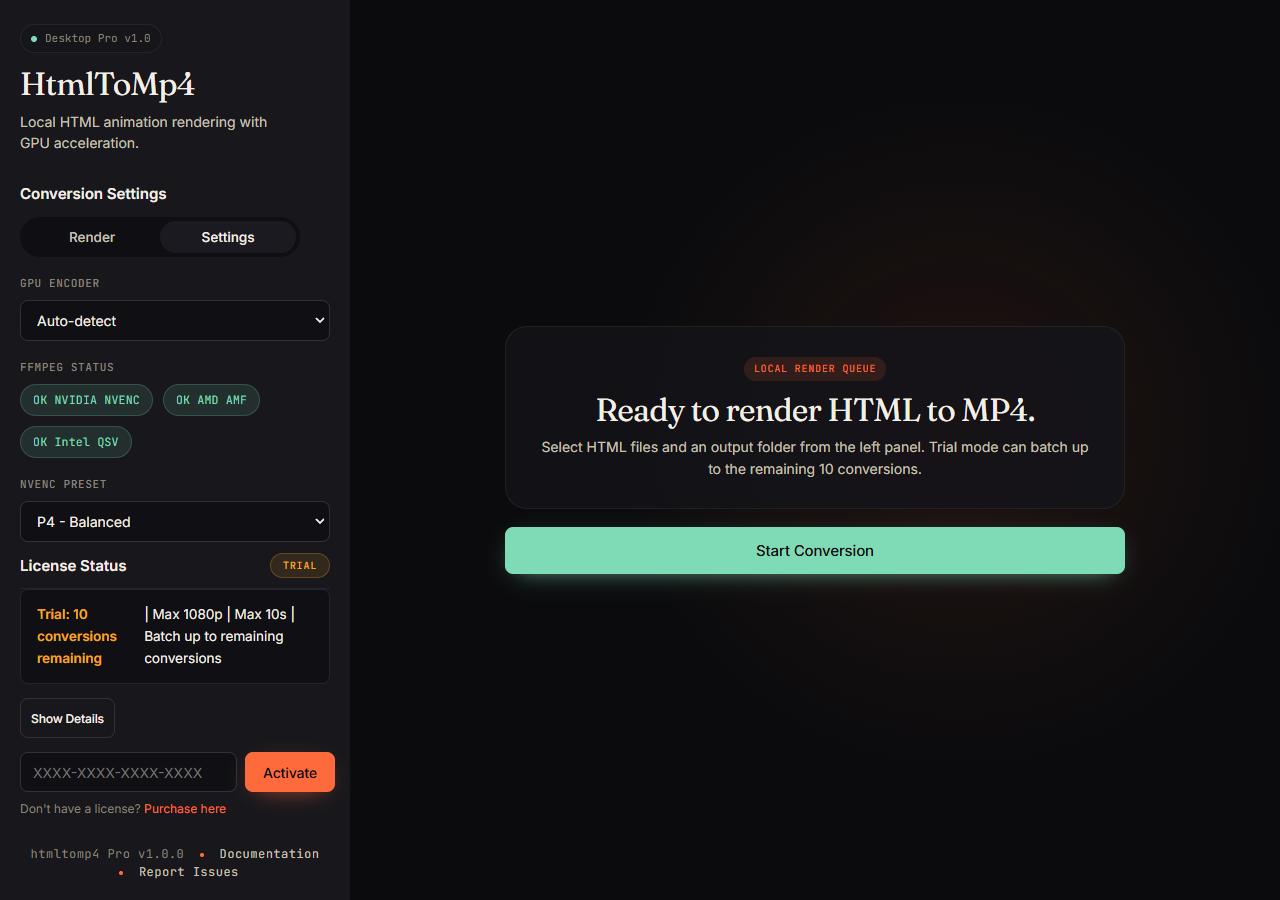
02
Auto-detect encoder support, choose the NVENC preset, and fall back to CPU when needed.
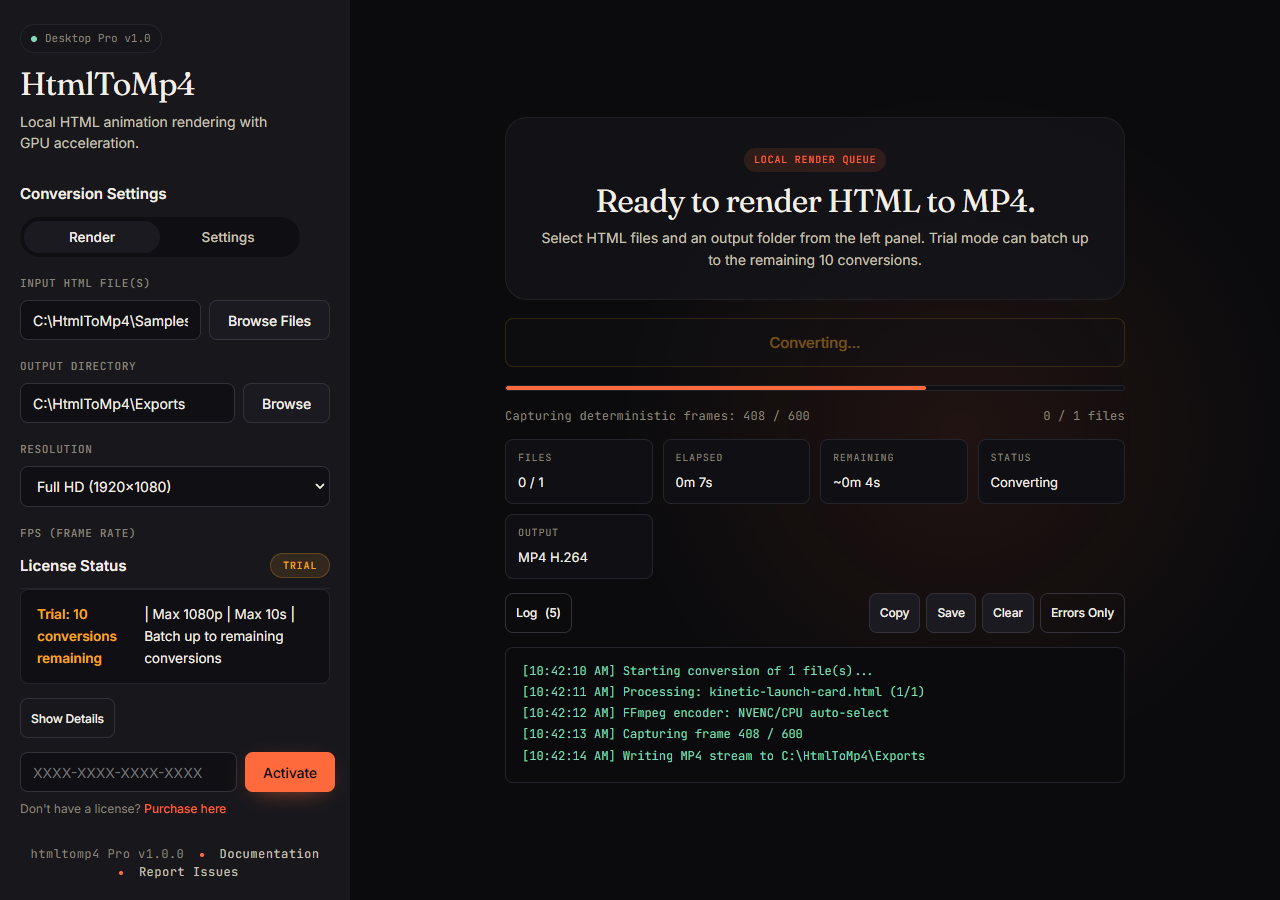
03
Track captured frames, elapsed time, remaining time, output format, and logs while rendering.
04
Open the finished output or convert again after the app writes the final MP4 stream.
Why htmltomp4
Keep the animation you already made.
Render supported CSS, Canvas and WebGL animations through Chromium. Keep dependencies with your HTML and test a short clip before a larger export.
Use the hardware you have.
Hardware encoding can speed up supported exports; CPU encoding is available too. Rendering time depends on your scene, resolution and computer.
Make videos on your own computer.
Your source files and video output are processed locally. License checks need internet, and animations may load external assets if their HTML references them.
Who it's for
Motion designers
Render your CSS or WebGL mock-up to 4K/60 without rebuilding it in After Effects.
Social media automation
Change the text, colours or images in your HTML, then batch-render your variations with Pro.
Dev teams
Export a short demo for a project update, README or presentation without asking viewers to run your code.
Creators & agencies
No uploads, no queue times, no per-minute bills. Render while you work on the next thing.
Compatibility
Desktop Pro runs locally on Windows x64, prefers NVIDIA NVENC for fast h264/hevc export, and falls back to CPU encoding when a supported GPU is not available.
Technical sheet
Under the hood: bundled Chromium, a deterministic RAF shim, JPEG piping into a tuned NVENC-backed FFmpeg.
Questions
The free trial includes 10 local test renders up to 1080p, 10 seconds each, one file at a time. Upgrade to unlock unlimited renders, batch processing, 4K/8K, and commercial use.
Each lifetime license includes activation on up to 3 machines you own. You can deactivate a machine from inside the app. If you change hardware or hit the limit, contact support for an activation reset.
Your HTML files, captured frames, and rendered videos stay on your machine. License activation contacts the license server with your license key, machine ID, app version, and platform.
After activation, the app can continue working offline for up to 30 days before it needs to revalidate the license.
Encoder support depends on your GPU, drivers, codec and output resolution. Use the app’s encoder detection and make a short trial render on your computer. CPU encoding is available when a suitable hardware encoder is unavailable.
A screen recorder captures a live browser session. HTMLtoMP4 renders through Chromium and controls supported animation timing frame by frame, which is useful for repeatable exports at a chosen resolution. Randomness, external assets and unsupported timing can still change the result; test your animation first.
HTMLtoMP4 starts from a local HTML file. If you already have a CSS, Canvas or WebGL animation, you can test it directly without first moving it into a different project structure. Files with missing assets or unsupported browser features may still need changes.
A white or blank MP4 usually means Chromium loaded the HTML file but the page did not render its animation. The most common cause is missing dependencies: scripts, CSS, images, fonts, or Vanta/Three.js files referenced with broken local paths like ../vendor/... or CDN URLs that could not load. Keep all referenced assets beside the HTML, use correct relative paths, or make the HTML self-contained. Also make sure the animation container has an explicit width and height before converting.
HtmlToMp4 works best with self-contained HTML/CSS/JS animations that can run in Chromium without login prompts, user clicks, cross-origin restrictions, unsupported browser APIs, or missing network assets. Very heavy WebGL scenes, live dashboards, remote media, DRM video, webcam/microphone input, and pages that depend on real-time servers may need cleanup before they render reliably.
Yes. It is already headless. Desktop Pro runs locally on Windows x64 and can render with NVENC when a GPU is available or CPU fallback for CPU-only jobs. Full flag reference ships with the app.
The Cloud API is not available for purchase. The product offered here is the Windows desktop app; hosted rendering and a separate community CLI remain future ideas.
The $0 download is the trial. Desktop Pro currently costs CAD $79 as a one-time purchase; checkout shows applicable taxes and currency conversion. Enter the purchased key in the same app to unlock Pro. Your source assets still need appropriate licenses for commercial use. Support: support@htmltomp4.com.